1.2 The RStudio layout
The first time you open RStudio, the console window will take up the entire left side. You will see three panes.
Once you open a script file, you will see the four-quadrant layout seen below.
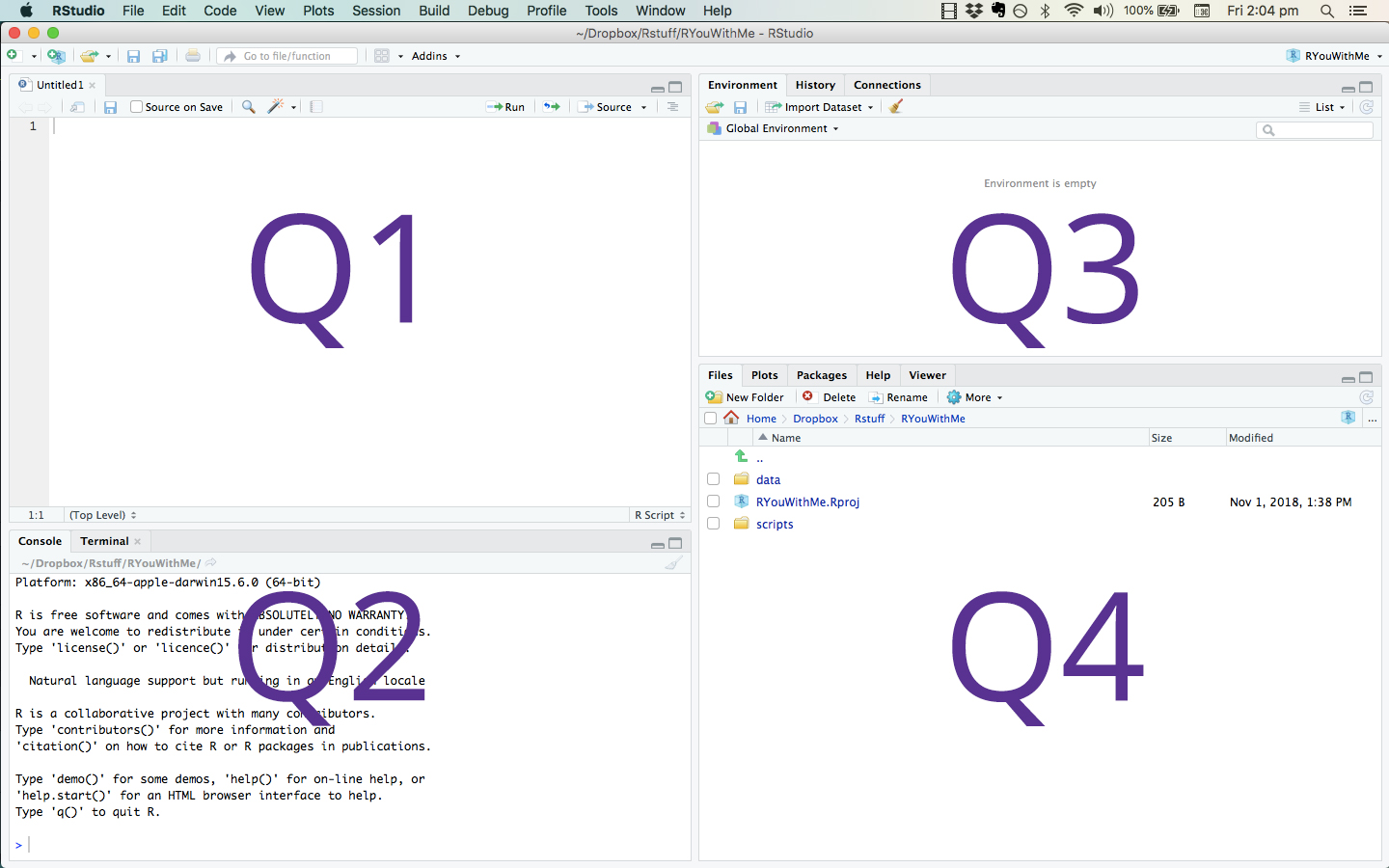
RStudio Four Tile Layout
Described below are the features in the four quadrants.
- Q1. The Script Editor window (upper-left quadrant above) is a workspace where you can write, edit, and save R commands. Rather than entering these commands in the console window, you can run them from the script editor. The advantage is that you can easily edit, save and re-run all your analyses.
- Q2. The Console window (lower-left quadrant above) displays results. You can interact with R directly in the console window by typing commands. Use the script editor, though, since you can save your work for later use.
- Q3. The Environment Window (upper-right quadrant above) gives you a list of all the objects you have created, including datasets, graphs, and statistical model results.
- Q4. The Files window (lower-right quadrant above) provides a lot of information. The files tab gives you a file explorer. The plots tab provides a history of the graphs you have made. The packages tab shows you the packages you have available and the ones you have enabled. The help tab allows you to see help files for functions and packages. Occasionally, things you are trying to see will show up in the viewer tab.
Note: the size of each of these quadrants is adjustable by dragging the edges.